Petz Utilities & More Masterlist
|
|
Utilities made by members of the community & general programs that are useful for us! There aren't any direct downloads here, but there are links to take you to the creator's page! Here's a tip though: There isn't one hexing program that does everything. These programs, are best used in combination with each other, for different parts of the hexing process. Take a look at the pros and limitations to figure out which programs are best used for what you are trying to accomplish! And of course, some of these are not used for hexing and are instead used for other purposes.
Quick alphabetical list of what is linked here:
Quick alphabetical list of what is linked here:
|
|
|
|
Main hexing programs are on top and programs that are not Petz specific are at the bottom, but otherwise they are not in any particular order in between so use Ctrl + F if you want to skip to something specific. Some utilities that provide similar functions or rely on each other are grouped close together.
PetzA - Sherlock Software
"PetzA is an add-on for Petz 2, 3, 4, 5 and Babyz that gives you tons of cool new features and even fixes bugs in the game. PetzA appears as a new menu item at the top of your Petz or Babyz game. " - Sherlock Software
The #1 most used tool for Petz, pretty much considered essential for playing. Depending on where you get your copy of the game from, it may have included PetzA already. Sometimes games won't even run correctly without it on modern computers! Full description is available on the download page.
The #1 most used tool for Petz, pretty much considered essential for playing. Depending on where you get your copy of the game from, it may have included PetzA already. Sometimes games won't even run correctly without it on modern computers! Full description is available on the download page.
Prism's PetzA Fork v3.5.0 (P3/P4) - mnemoli/Ratshack
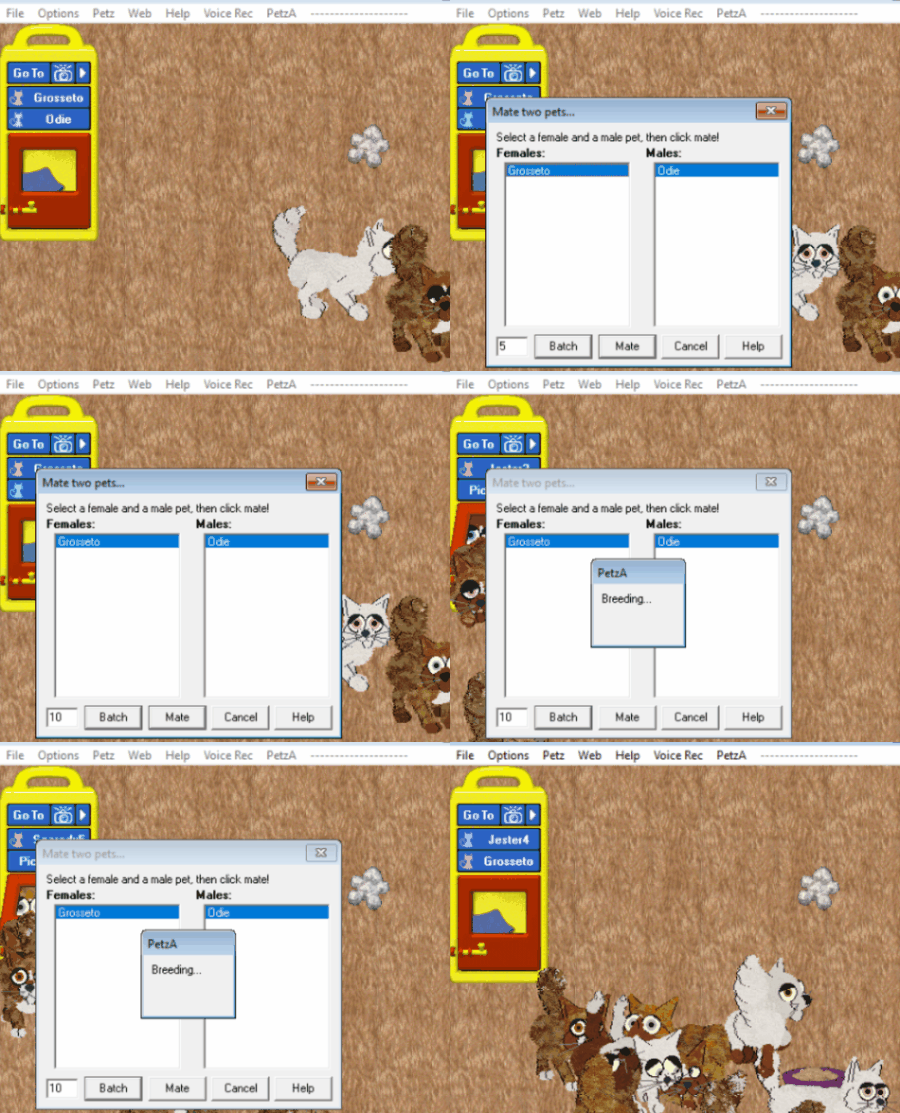
(Game is not this slow)
|
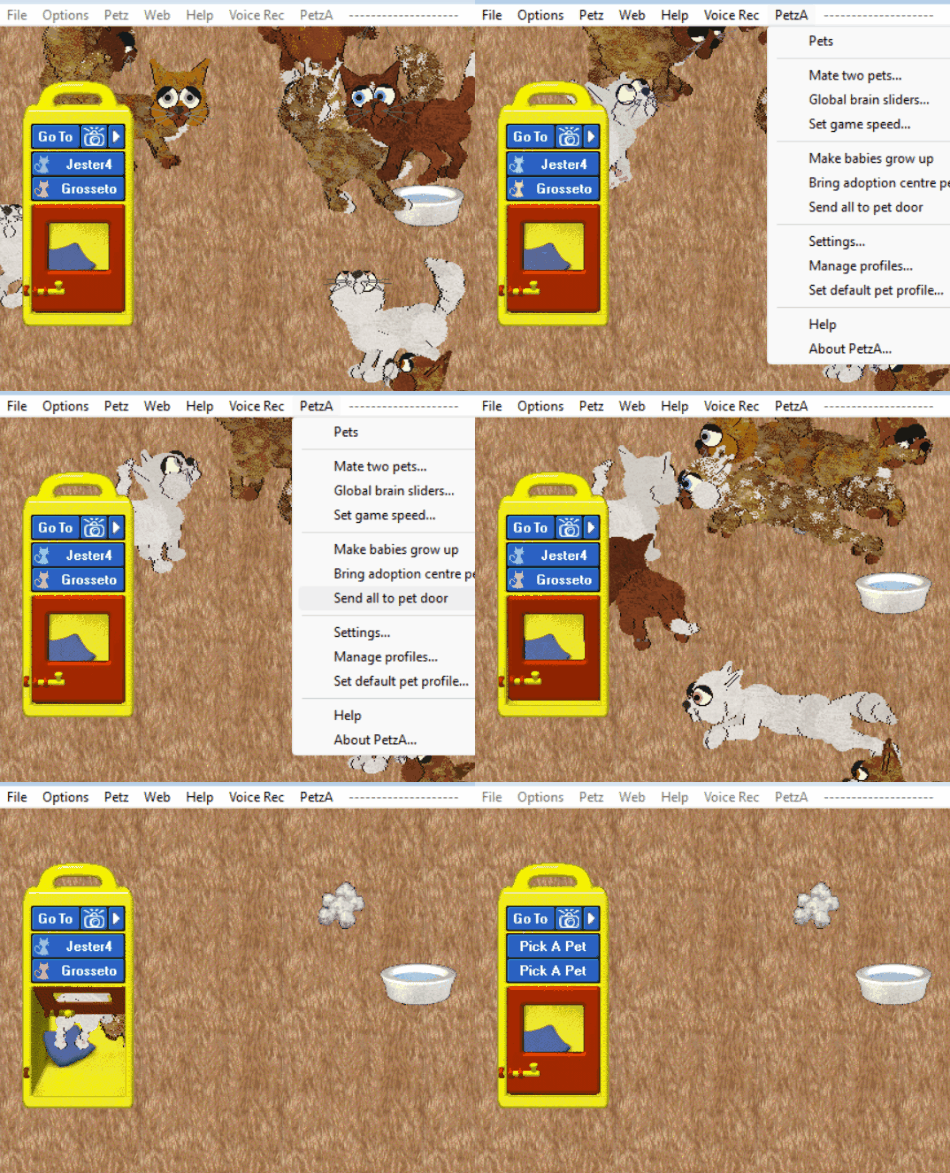
(Weebly has a low file size limit)
|
Has all of the same features as the original PetzA, with the following additions:
Tree trim parents with large file sizes before batch breeding!" - Ratshack
- "Pets will not accumulate neglect from not being taken out each day
- Instant batch breeding (see instructions below)
- New setting to stop pets reacting to the camera
- Menu option to send all pets to door
- Menu option to set a default pet profile. All pets born ingame will receive this as their default profile comment. Use this to record your rules and contact info on pets you breed!
- Nametags for P3/P4
- New photo name format: petnames-yymmddhhmiss-#. Easily sort your autosaved photos by pet and never hit a photo limit!
- Ability to bypass 'wrong version' warning (only intended to replace splash screens etc - be careful with this!)
- Menu options to instantly age all to 12 or 100
- Settings option for AC pets to come out at age 100
- Ability to texture irises in P4
- Settings option for auto-transparent png/gifs
Tree trim parents with large file sizes before batch breeding!" - Ratshack
LNZ Pro - Sherlock Software
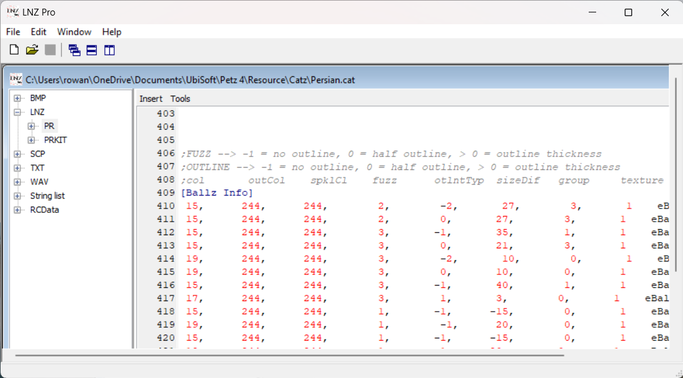
"LNZ Pro is an all-purpose Petz, Babyz and Oddballz file editor. It can edit breeds, pets, babies, toys, playscenes and other Petz resources." - Sherlock Software
LNZ Pro is essential to hexing (customizing) nearly all parts of the game, and is most commonly used for editing breeds (.dog and .cat) and pets (.pet). Pets and breeds are represented by numbers in rows and columns, and each column has a specific meaning, such as color, size, and texture.
Pros:
LNZ Pro is essential to hexing (customizing) nearly all parts of the game, and is most commonly used for editing breeds (.dog and .cat) and pets (.pet). Pets and breeds are represented by numbers in rows and columns, and each column has a specific meaning, such as color, size, and texture.
Pros:
- LNZ Pro can be used to fully edit the appearance of pets and breeds, create new marking areas for breeding, code color, marking, size, texture, and more variations into a breedfile, import custom sounds, add new textures, and much much more.
- LNZ Pro is needed in order to texture and anchor paintballs.
- There is a comprehensive "Help" file included which goes over what each column represents in each section, shows you ball numbers, pallet number, and gives advice on how to do a wide variety of things.
- There is no visual model, and so you can't see any of your changes in real time.
- Not effective for creating new addballz, connecting linez or placing paintballz.
LnzLive - mnemoli/Ratshack
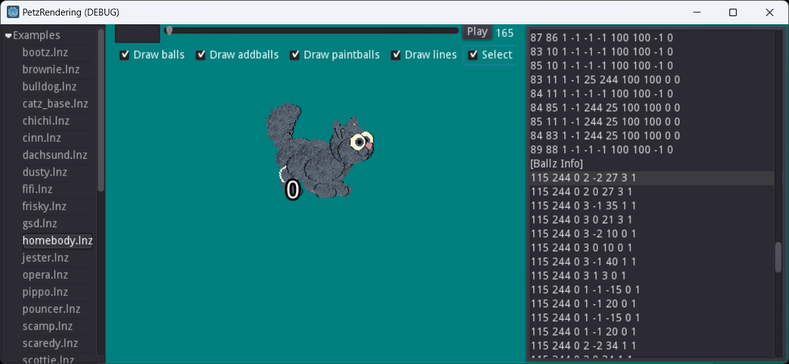
LNZLive functions very similarly to LNZ Pro, but with the added bonus of having a visual model that is very close to the in-game appearance. The editing interface is the same, with rows and columns of numbers. It is available as a download .exe or a browser version. Personally, I use this for almost all the hexing that I do. However, it must be used with LNZ Pro, and is not a replacement for it.
Pros:
Pros:
- Visual model that shows you real time changes, and is a pretty close match to the in game appearance.
- Hover over balls to see the ball number, click on them for your cursor to jump to the associated row in the editor!
- Has functions to quickly recolor the whole pet, certain parts of the pet, color swap, color swap paintballs, etc.
- Has a function to mirror changes.
- Supports internal and external textures so you can quickly preview what the textures will look like on your pet.
- Only works with .pet files, not breeds. You can take the relevant sections of a .pet and paste it over the same sections on a breed to use this to edit breeds.
- Does not open or save files directly, the LNZ must be opened in LNZ Pro, then copy/paste it back and forth, and save in LNZ Pro.
- Not effective for creating new addballz, connecting linez, or placing paintballz.
- Just edits the visual aspect of the file.
Pet Workshop - Sherlock Software
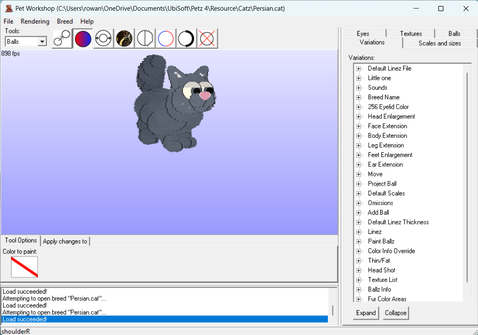
"Pet Workshop is a tool which lets you edit and change Petz breeds (Catz and Dogz) while you view them in 3D! Pet Workshop makes creating breeds as easy as point and click." - Sherlock Software
Pet Workshop is used to edit breed files with its own menu options that are more intuitive, such as clicking a ball with the color tool to change its color to whatever color you've selected.
Pros:
Pet Workshop is used to edit breed files with its own menu options that are more intuitive, such as clicking a ball with the color tool to change its color to whatever color you've selected.
Pros:
- Excellent for creating new addballz, connecting linez, and placing paintballz.
- Has a user friendly layout and editing toolbar.
- Visual aspect.
- There is no undo button. Save often!
- The model is more "bloated" than the appearance in-game.
- The model cannot be dragged around in the window, so at high zoom levels its often frustrating to get it at the right angle to see what you want to see.
- Changes can't be mirrored exactly, only eyeballed. Using LNZ Pro or LNZLive to mirror changes allows for precision.
- Paintballs are not anchored and can't be textured in this program, and it will un-anchor any paintballs that are.
- Does not work with .pet files, only breed files.
PastyLabz - yakrell (+Blender)
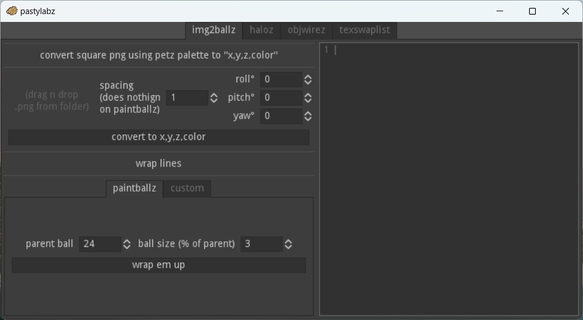
PastyLabz has the ability to do four things:
- Converts png images to a paintball code to paste into the [Paintballz] section using LNZPro
- Creates perfect circles of addballz+linez for applications like halos, collars, anything you can think of so you don't have to manually try to make a circle that isn't lopsided.
- Converts .obj files made in blender into ballz and lines - very useful for making complex, 3D shapes in an interface other than Pet Workshop
- Creates LNZ for texture swap variations with ease, instead of a long and painful manual process
Neglect-Me-Not - Reflet
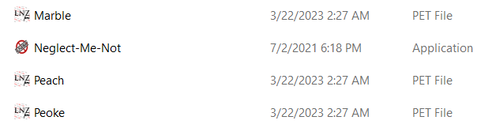
"Place this .exe file in a folder with pets, and Neglect-Me-Not will find all of your neglected pets and un-neglect them. Note that if you haven't started your Petz game for the day, some pets may gain 10 neglect upon starting the game.
Both P3/4-format and P5-format pets are acceptable.
It's a console application, it just does its thing and exits, so it doesn't have an interface. You may see the console window flash up briefly before closing itself, that's normal." - Reflet
Note that you need to double-click and run the application for it to do its thing.
Both P3/4-format and P5-format pets are acceptable.
It's a console application, it just does its thing and exits, so it doesn't have an interface. You may see the console window flash up briefly before closing itself, that's normal." - Reflet
Note that you need to double-click and run the application for it to do its thing.
Petz Pic Factory - Sherlock Software
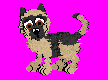
Petz pic factory is a small program that generates a .gif like the one shown for all the pets in the folder that it is run in. This is the image that is shown on the "pick a pet" menu in game. I use this to make a custom breed image in the adoption center by using a pet adopted from it.
Tinker - Sherlock Software
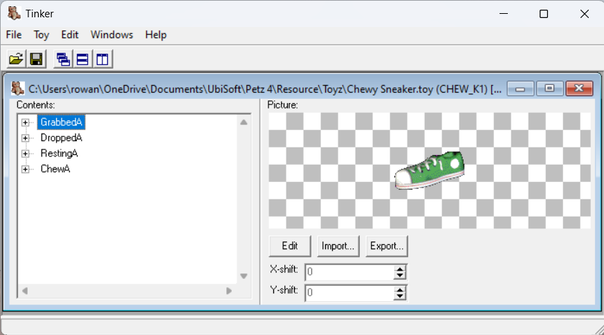
"Tinker is a program to edit toys, clothes on-shelf graphics, playscene items, and other filmstrips for Petz 2,3,4,5, Babyz and Oddballz. Tinker also lets you edit the Petz 5 toycase to allow you to add custom toys to your toycase." - Sherlock Software
Personally, I don't know anything about toy editing, but this is the program that lets you do it! Necessary for Petz 5 players to add downloaded toyz to their games.
Personally, I don't know anything about toy editing, but this is the program that lets you do it! Necessary for Petz 5 players to add downloaded toyz to their games.
P4 FLM image extractor - mnemoli/Ratshack
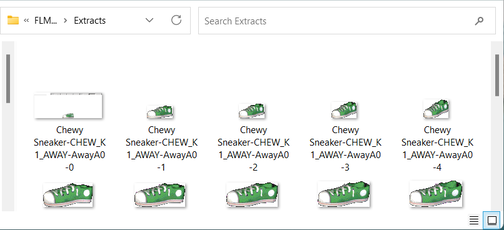
Extracts the sprites from .toy files, as either transparent .png or .bmp images. Place in the same folder as the toy or toys you want extracted. Double clicking and running the file produces a folder named "Extracts" with one .bmp image, the resting sprite. If you want transparent png images, and/or all of the frames, this program needs to be run using a command prompt.
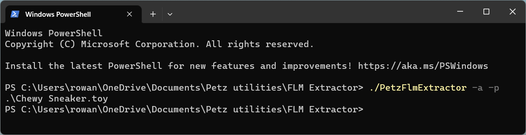
If you don't usually do this like me, it can be confusing. I have windows powershell as my command program. I'm using windows 11. What I do is a right click in the same folder that the .exe is in, and then select "open in terminal" to bring up windows powershell already set up to run something in that folder. Then type "./PetzFlmExtractor" followed by "-a" for all frames, "-p" for .png, or both for all frames as transparent .pngs. Hope that helps!
If you don't usually do this like me, it can be confusing. I have windows powershell as my command program. I'm using windows 11. What I do is a right click in the same folder that the .exe is in, and then select "open in terminal" to bring up windows powershell already set up to run something in that folder. Then type "./PetzFlmExtractor" followed by "-a" for all frames, "-p" for .png, or both for all frames as transparent .pngs. Hope that helps!
PetzFlux - Reflet
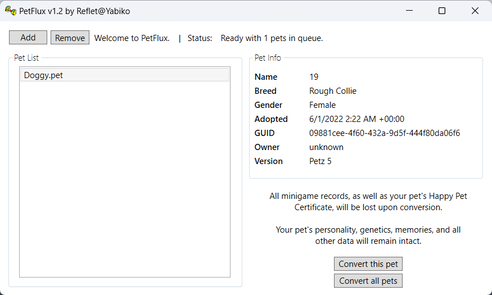
Converts P5 petz into P4 petz. They are not normally backwards compatible.
If your pet has learned tricks in P5, you will need to download PetzByte and PetzTrickFixer to fix messed up trick data that converting them causes.
If your pet has learned tricks in P5, you will need to download PetzByte and PetzTrickFixer to fix messed up trick data that converting them causes.
PetzByte - Reflet
"This is a simple Python script that will recalculate the checksum of any .pet file. Simply drag and drop the file onto PetzByte, and watch the magic happen." - Reflet
This tool is necessary if you do any editing to a .pet using a hexidecimal editor in order to prevent a corruption error. There is one further down the page.
This tool is necessary if you do any editing to a .pet using a hexidecimal editor in order to prevent a corruption error. There is one further down the page.
PetzTrickFixer - Thor/Kyokichi
[Image Coming Soon]
IF you've taught your pet tricks in Petz 5 then converted them using Petzflux to Petz 4, trick data can get messed up and your pet will no longer do the right tricks that you taught them. This tool is used to fixes broken trick data in pets. Needs java to run since it is a .jar file. The download link has great instructions!
You will also need PetzByte, which is linked right above, since this program does not include checksum recalculation.
You will also need PetzByte, which is linked right above, since this program does not include checksum recalculation.
Genepoolz - Reflet
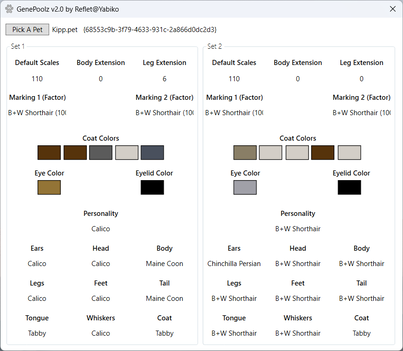
"Open any .pet file via the Pick A Pet button. GenePoolz will find your pet's genome and display both the dominant and recessive genes hidden there! No more guessing at traits! You can also hover over any color to get the exact LNZ number for it." - Reflet
GoalDescriptorAnalyzer - Reflet
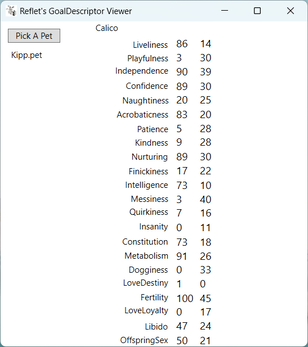
Shows your pets personality values. This file was made by Reflet like many of the other utilities here, but hasn't been uploaded to their main site and instead is often passed around on Discord, so it is hosted here unlike the others. The first column is the one to read for Petz 3/4, and if I remember correctly, the second column for a Petz 5 pet. Pregnant pets will not show accurate values.

| goaldescriptoranalyzer.exe |
PetzChecker - Thor/Kyokichi
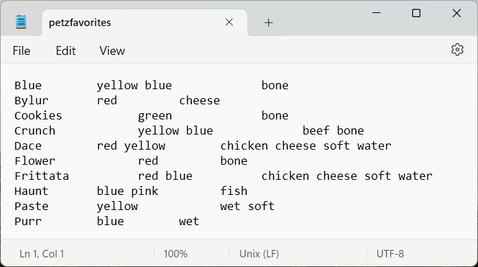
A simple java program that reads the favorites of all the pets that are in the same folder, and generates a .txt as the output in the same folder.
Runaway Rescue - Firebird @ MKandC
Restores Runaway Petz!
Auto-Backup - mnemoli/Ratshack
"Backs up your Adopted Petz and PetzAProfiles folders before running the game. Maintains 10 past backups (storage is cheap!) in a Backups folder inside your Petz folder." - Ratshack
Play Scene Converter -Lesley @ apkc's husband
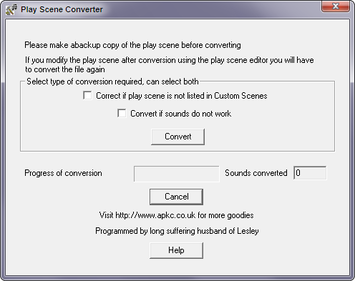
Sometimes the sounds don't work for playscenes made using the in-game playscene editor, or they do not show up at all. This program will fix that issue.
Petz Thumbnails (P4) - mnemoli/Ratshack
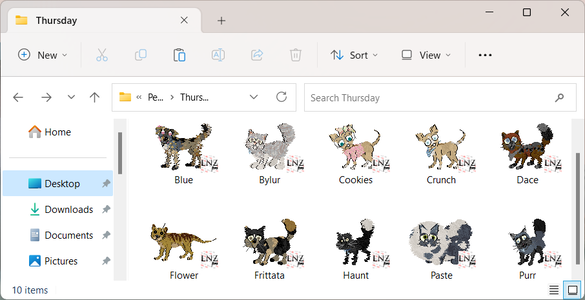
Install this program to make all your .pet icons look like themselves! No more wondering who is who in folders full of 30+ random breeding pets named HsKsfdaf12.pet, HeMk243.pet, nofdsafsjf2.pet, etc! Make sure you set your folder to be viewing "medium" or "large" icons to see the pets. My screenshot is how mine looks when set to "large". Just install it anywhere you'd like and no other action is needed. Confirmed to work on Windows 10 and Windows 11 at the least.
UPDATED: Now also displays .toy, .clo, .dog, and .cat to look like themselves as well! Known issue is that some breed files with internal textures may display the texture as the thumbnail instead of the adoption center image. Some toys won't have the best sprite representing them, such as the spray bottle being water droplets and treat boxes being just a single treat.
May need to refresh the download page if you do not see it listed.
UPDATED: Now also displays .toy, .clo, .dog, and .cat to look like themselves as well! Known issue is that some breed files with internal textures may display the texture as the thumbnail instead of the adoption center image. Some toys won't have the best sprite representing them, such as the spray bottle being water droplets and treat boxes being just a single treat.
May need to refresh the download page if you do not see it listed.

Petz EZLoader - skissors@Alive Enough
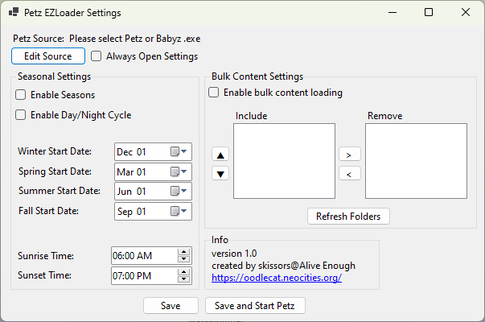
Using overwriting playscenes, you can create the illusion of day/night cycles and seasons in Petz 3/4. It can also automatically swap any seasonal toys or clothes that you would like. Its like PetzA profiles but for other stuff. I recommend reading the full description to get a full understanding, quoted from [this post] by skissors on Whiskerwhick. It's large so it is under the cut:
Click for full description
Petz 3, 4, 5 and Babyz compatible, Petz EZLoader basically acts as a wrapper for your game, automatically adding and removing content from the game's Resource folders to make managing content easier. Right now it has two major features: real time day/night cycles and seasons, and bulk content loading.
Day/Night Cycles and Seasons
Yes, day/night cycles and seasons have come to P3/4 at last! Well, kinda. This feature automatically loads a set of playscenes into your game based on the current date and time. When combined with a set of OW playscenes, this creates the illusion that day/night cycles and seasons exist in the game.
Unfortunately, since I am not an artist, there's not yet a full set of base game playscenes OW that correspond to each of the seasons and times of day. Therefore, I'm reaching out to the community for help. I know there are quite a few people who have a knack for creating P.F. Magic match playscenes, and some that have even created seasonal variants of the base game scenes already. If you are one of those people and would like to help with the project, please reach out! Ideally I'd like to get a full set of playscenes that match the game's originals that I have permission to distribute with the mod. It would also be great to have a "windows graphics" pack included to make creating compatible Family Room and Kitchen playscenes easier, since the only part of those playscenes that need to change are what's outside the windows. Swapping which playscenes are used is as easy as copying a file into a folder, so my hope is that eventually people might decide to make alternate sets of scenes that are compatible, giving people even more options for customizing their game. This seasonal loading system works with all playscenes, not just the ones that came with the game, so creating totally custom day/night or seasons enabled scene sets is a possibility as well!
Bulk Content Loading
Bulk content loading is more straightforward. Basically, it allows you to add or remove folders full of content from your game with the click of a button. This should make organizing and managing game content a lot easier, especially with all the cool holiday items being developed. There is a little bit of nuance required to get this feature set up correctly, especially if you plan to use it with overwriting files, but once you do it makes organizing custom content so much easier.
And More...?
Yes! While I am super excited to release Petz EZLoader to you all, I still feel like it could be better! I have several ideas for features to add to make it an even better mod management system.
The biggest feature I want to add is some sort of weather system! However, I'd really like to get feedback from the community (and especially playscene makers) about what types of weather to include. I also would like to know if people would be interested in more complicated seasonal and weather effects that take place over multiple days, such as snow falling and staying on the ground for a few days before melting, or rain that leaving puddles behind the next day. This is all very doable from a code perspective, so it all comes done to weather any of our wonderful playscene artists would wanna take up the challenge of making so many scenes!
The other ideas I have are bit more stretch goal-y, and may not pan out depending on various factors. One of the biggest would be using location data and connecting to the internet in order to have the in-game season and weather match with what's actually happening in your location, for a truly immersive Petz experience lol. The other would be a built-in creator subscription services, that will automatically fetch new in-game content from your favorite creators and load it directly into your game. This would require creators be willing to add a special page to their site that the mod can connect to to get this content though, so there would have to be enough petz creators willing to do such a thing to make adding something like this worthwhile.
I would also love to hear more ideas from you! Obviously there are a lot of limits to what this mod can do, as it's not actually modding the game, more so just moving files around. But even within those limits, I still feel like there may be more creative things I could do. Also, if anyone has any issues with the program, please let me know! It should be pretty robust, but I admittedly didn't test that much, especially with P5 and Babyz since I don't use those games. For example, P5 people will still probably have to use Tinker to add new toyz to the carrying case with the bulk loading system.
Texture Anchor Utility - Brynn Bytes
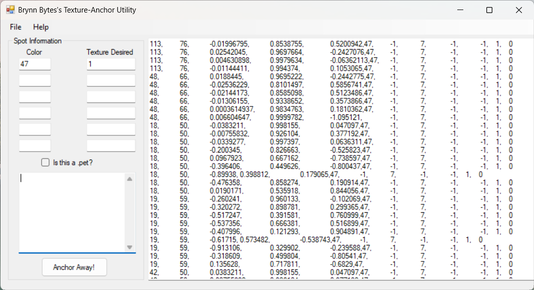
"This program goes through your paintball codes fresh from Petz Workshop and adds the appropriate texture codes and anchors it for you. " -Fleabagz
Provides a method of quickly anchoring paintballz. This will only work if you want all the paintballz of a particular color to be the same texture. Copy&Paste your paintball code from LNZPro into the small box on the left. Enter all the colors of the paintballz (don't skip any) and what texture off your texture list you'd like it to be. Then copy/paste your newly textured and anchored paintballz onto the file in LNZPro. Be aware that you won't want to anchor the pawpads, so just don't copy them into this program and make sure you don't accidentally delete them when pasting your newly anchored ones back into LNZPro.
Provides a method of quickly anchoring paintballz. This will only work if you want all the paintballz of a particular color to be the same texture. Copy&Paste your paintball code from LNZPro into the small box on the left. Enter all the colors of the paintballz (don't skip any) and what texture off your texture list you'd like it to be. Then copy/paste your newly textured and anchored paintballz onto the file in LNZPro. Be aware that you won't want to anchor the pawpads, so just don't copy them into this program and make sure you don't accidentally delete them when pasting your newly anchored ones back into LNZPro.
Auto-Spotter - Brynn Bytes
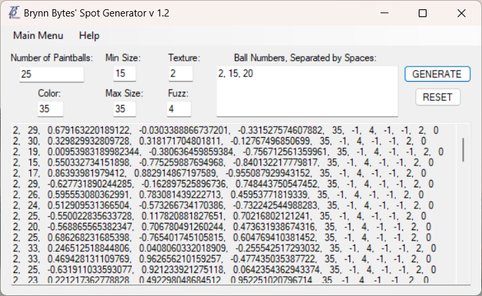
"This program allows you to generate completely a series of spot codes. Just enter the color, texture, and balls you want to get spots, and the number per ball (this is important) and you are good to go! " - Fleabagz
Paint Ballz Anchor Tool - Kas @ Kasual Kennels
[Image Coming Soon]
Quickly anchor your paintballz with a simple copy/paste using this web-based utility. It also lets you quickly modify any of the other traits of the pasted paintballz in one go. Hosted at oasis under "Etc".
Spot Line Generator - Harli
[Image and example coming soon]
This tool creates a straight line of paintballs between any two given paintball points! Hosted as a web based utility at Oasis under "Etc."
P5 Unmute Utility - Speedwagon
"Due to a bug in the game, Petz 5 occasionally (often) produces mute babies when breeding mixies. This handy utility created by Speedwagon allows you to quickly and easily (literally with the click of a button) fix the muteness of all mute petz within any selected folder! Petz that are not mute will be left untouched." - Ratqueen
Petz4 Hotkeys - Reverie
Adds hotkeys for breeding petz, making babies grow up, restoring original colors, and opening up PetzA brainsliders.
PetzID -Petz@pbalik
Checks for ID clashes and tells you which items are clashing. Note: LNZPro can do this for everything except for clothing, so this is most useful for clothing clashes. Requires you to be able to run a command line.
Petz Show Companion - Eddy Bones
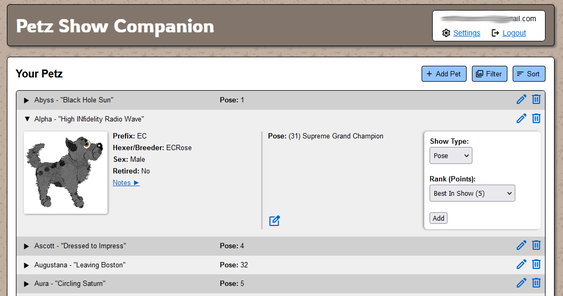
"This web based utility allows you to track show points and other data for your petz. Keep tidy records of titles, breeders, and more! User data is even backed up regularly for your peace of mind. " - ECRose
IrfanView + Petz Palette
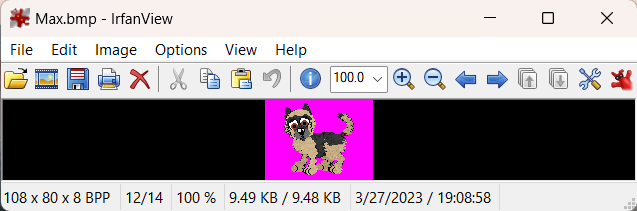
A non-petz specific freeware graphics editor. Used in combination with the petz pallet .pal file to convert images to the petz pallet so they can be used in the game. This is needed for making adoption center images, textures, and toys. When your image is open in Irfanview, go to Image > Pallet > Import Pallet and then select the .pal file provided. Save as .bmp and you are done! Uncertain who created the Petz Palette, but the file is often shared by itself without linking to anyone specific. However, if you know who the creator is, let me know!

| |||
Petz Image Helper - Kashi
Converts the white background in petz pix images to transparent. Works with images saved as .bmp, .png, or .gif. It does convert the whites of dog eyes to be transparent as well, so some correction will be needed.
Found under Take -> Other files
Found under Take -> Other files
HxD
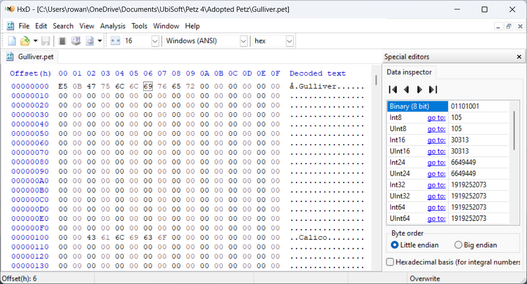
A non-petz specific freeware hexidecimal editor. Used for editing things like personality traits, if you follow a guide on how to do so. If you edit a .pet using this, you will need to also get PetzByte (further up the page) to recalculate the checksum so your pet does not corrupt!
It displays a little bit different than Hexplorer does, and I personally prefer this one over it, but either one works. This one highlights unsaved changes in red which I think is very helpful.
It displays a little bit different than Hexplorer does, and I personally prefer this one over it, but either one works. This one highlights unsaved changes in red which I think is very helpful.
Hexplorer
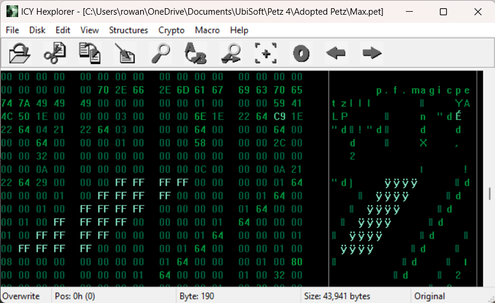
A non-petz specific freeware hexidecimal editor. Used for editing things like personality traits, if you follow a guide on how to do so. If you edit a pet using this, you will need to also get PetzByte (further up the page) to recalculate the checksum so your pet does not corrupt! It displays a little different than HxD does, so use whichever one you prefer.
TIP: If everything is very tiny, try changing the font.
TIP: If everything is very tiny, try changing the font.
Resource Hacker - Angus Johnson
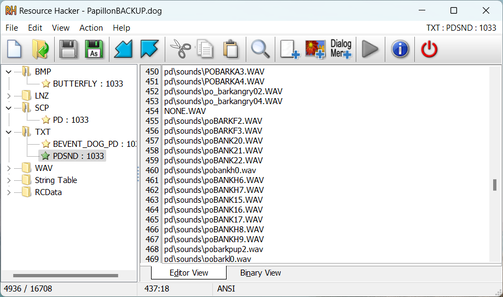
"Resource Hacker™ is a resource editor for 32bit and 64bit Windows® applications. It's both a resource compiler (for *.rc files), and a decompiler - enabling viewing and editing of resources in executables (*.exe; *.dll; *.scr; etc) and compiled resource libraries (*.res, *.mui). While Resource Hacker™ is primarily a GUI application, it also provides many options for compiling and decompiling resources from the command-line."
Don't know what that means for us? Don't worry about it! In simple terms, this program is used for switching out different parts of the game with replacements, or extracting them. For breedfiles, this is an easy way to switch internal sounds or swapping scp, by deleting one folder and importing another from a different breed or folder. There are many other applications; but if you are looking for the program, it is likely that you have read about someone else's work using it and are trying to achieve something similar, or you do understand a lot more about its potential functions already. I am not knowledgeable in this area.
Don't know what that means for us? Don't worry about it! In simple terms, this program is used for switching out different parts of the game with replacements, or extracting them. For breedfiles, this is an easy way to switch internal sounds or swapping scp, by deleting one folder and importing another from a different breed or folder. There are many other applications; but if you are looking for the program, it is likely that you have read about someone else's work using it and are trying to achieve something similar, or you do understand a lot more about its potential functions already. I am not knowledgeable in this area.
Transparent Background Converter - Kibbelz
Converts all the .bmp images in the folder to .png with a transparent background, useful for petz pix.
ScreenToGif
|
|
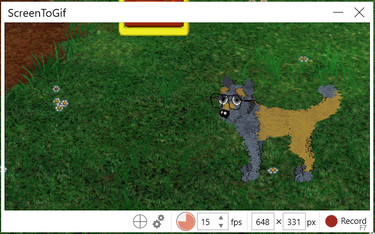
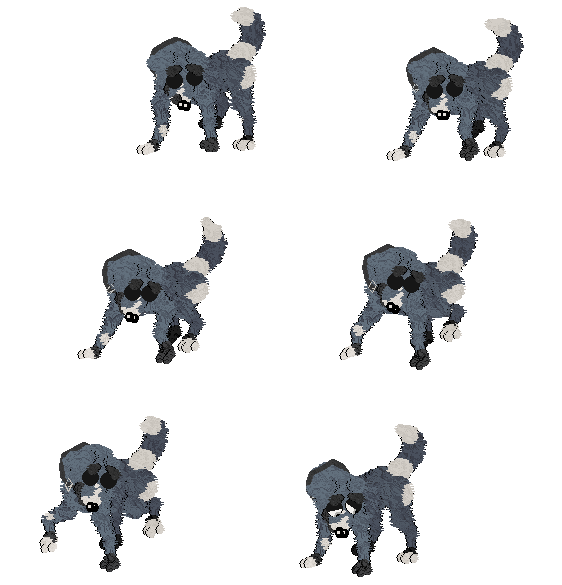
A freeware screen recorder with an awesome editor commonly used to make gifs by the petz community, such as the one on the right. Has a built in function for making them transparent, as long as the gif has a solid background. I use the playpen on the solid grey wallpaper. It has a resizable window and records whatever is inside of it.
TIP: In order for your gif to turn out correctly and not weirdly large/blurry, you must make sure that in your computer resolution settings, the zoom % is set to 100%. By default on many modern computers and laptops, it is set to 150% with a high resolution. When you lower it to 100%, you may also need to lower your resolution as well in order for the game to not look tiny.
TIP: In order for your gif to turn out correctly and not weirdly large/blurry, you must make sure that in your computer resolution settings, the zoom % is set to 100%. By default on many modern computers and laptops, it is set to 150% with a high resolution. When you lower it to 100%, you may also need to lower your resolution as well in order for the game to not look tiny.
7-Zip
If you don't have anything to open/create .zip folders, 7-zip is a freeware program to do so.
